


AWS Transit Gateway is one of the most useful networking tools available on Amazon Web Services today. If you manage cloud infrastructure and feel like your network is getting harder to control, this guide will help you understand exactly what Transit Gateway does, how it works, and why so many companies now depend on it.
What Is AWS Transit Gateway?
AWS Transit Gateway is a service that connects your Amazon Virtual Private Clouds (VPCs) and on-premises networks through a single, central hub. Think of it like a busy airport. All flights go through the central terminal, and passengers can easily connect to any other destination from one place. Without it, each plane would need its own direct route to every other plane, which quickly becomes messy.
Before Transit Gateway existed, companies had to set up individual VPC peering connections between every pair of networks. If you had 10 VPCs, you could need up to 45 separate connections. With Transit Gateway, every network connects to one hub, and that hub handles all the routing automatically.
How Does AWS Transit Gateway Work?
Transit Gateway uses a hub-and-spoke model. Each VPC, VPN connection, or on-premises data center connects to the central gateway as a “spoke.” All traffic between your networks passes through the hub, which decides where to send each data packet based on routing tables you set up.
The service works at Layer 3, meaning it reads the destination IP address of each data packet and forwards it to the right place. It supports both IPv4 and IPv6 traffic. You can also set up multiple route tables to control which networks can talk to each other, which helps you keep production and test environments separate and secure.
Key Benefits of AWS Transit Gateway
Simpler Network Management Managing dozens of VPC peering connections is time-consuming and easy to get wrong. Transit Gateway replaces that complex web of connections with one central point. When you add a new VPC, you attach it to the gateway once, and it can immediately communicate with all the other connected networks.
Better Security All traffic between Transit Gateways stays on the AWS global private network and never travels over the public internet. This reduces the risk of common attacks. In November 2024, AWS also added full encryption support for Transit Gateway, so you can enforce encryption-in-transit for all traffic passing through it.
Scales With Your Business Transit Gateway grows with you. It can connect up to 5,000 VPCs and automatically handles more traffic as your workloads increase. You do not need to plan for capacity in advance or buy extra hardware to keep up with demand.
Cross-Account and Cross-Region Support Many companies run workloads across multiple AWS accounts. Transit Gateway uses AWS Resource Access Manager (RAM) to share one gateway across all accounts in your organization. You can also peer Transit Gateways across AWS regions to connect global networks while keeping data on the AWS backbone.
Common Use Cases
Multi-VPC Environments If your company runs separate VPCs for different teams, projects, or environments, Transit Gateway gives you centralized control over how they connect. You can build and manage applications across thousands of VPCs without having to update routing tables one by one.
Hybrid Cloud Connections Many businesses run some systems on-premises and some in the cloud. Transit Gateway works seamlessly with AWS Direct Connect and Site-to-Site VPN, so you can connect your office or data center to your cloud networks through a single gateway. This makes hybrid cloud architecture much easier to set up and maintain.
Network Isolation for Compliance Some industries require strict separation between certain systems, such as keeping financial data away from general business applications. Transit Gateway lets you create isolated routing domains within a single gateway, so different environments cannot communicate unless you specifically allow it.
Centralized Security Inspection You can route all traffic through a central security inspection point by attaching AWS Network Firewall directly to your Transit Gateway. This setup, available since June 2025, means all your network traffic goes through one security layer before reaching its destination.
AWS Transit Gateway vs. VPC Peering
A common question is: when should you use Transit Gateway instead of VPC Peering?
VPC Peering is a direct, one-to-one connection between two VPCs. It has no monthly attachment fee and low data transfer costs, making it a good choice for simple setups with only two or three VPCs. However, it does not support transitive routing, meaning VPC A cannot talk to VPC C through VPC B. You must set up each connection manually, which becomes very hard to manage as your network grows.
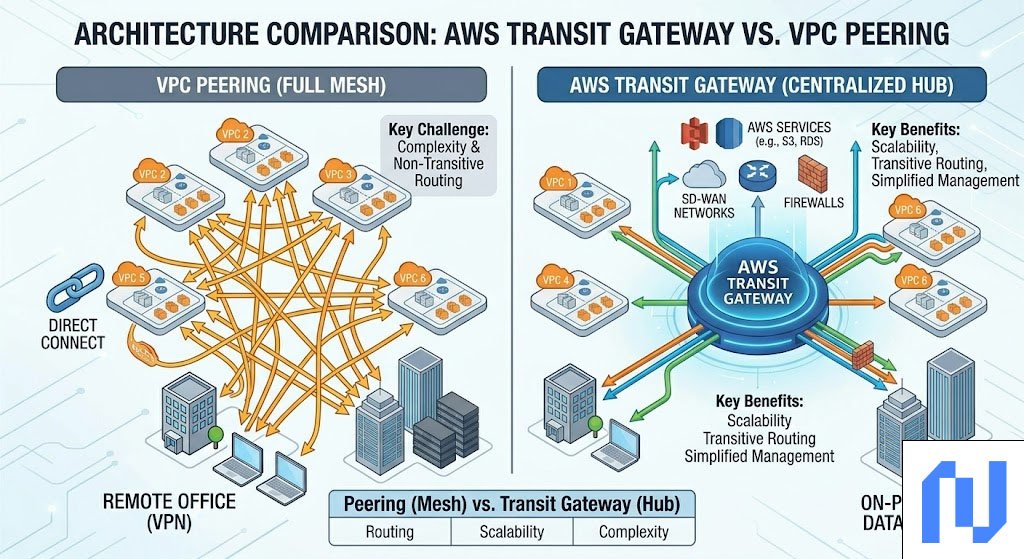
Transit Gateway becomes the better choice when you manage more than five or six VPCs, work across multiple accounts, or need centralized control over routing and security. The operational time you save on network management often outweighs the extra cost. As one rule of thumb: if connecting 10 or more VPCs, Transit Gateway is almost always the right decision.
Understanding the Pricing
AWS charges for Transit Gateway in two ways. First, you pay an hourly fee for each attachment, which is each VPC, VPN, or Direct Connect connection to the gateway. Second, you pay for the amount of data that passes through it.
In November 2025, AWS launched Flexible Cost Allocation for Transit Gateway. This feature lets you control how data processing costs are distributed across accounts in your organization. For example, instead of the central networking account paying for all traffic costs, each team’s account can be billed for the traffic it generates. This makes cost tracking much more accurate for large organizations.
How to Monitor Your Transit Gateway
AWS gives you several tools to keep an eye on your Transit Gateway traffic. You can publish Transit Gateway Flow Logs to Amazon CloudWatch Logs or Amazon S3. These logs show you the source and destination of traffic, how much data moved, and whether connections succeeded or failed.
You can also use AWS Transit Gateway Network Manager for a broader view of your entire global network. It shows your VPCs, on-premises locations, and Transit Gateway connections all in one place, making it easier to spot problems and understand your network’s health.
Conclusion
AWS Transit Gateway simplifies cloud networking by replacing complex, hard-to-manage connections with a single, central hub. It scales well, improves security, supports hybrid environments, and reduces the time your team spends on network maintenance. Whether you are running a growing startup or managing enterprise infrastructure across multiple regions and accounts, Transit Gateway is a practical solution that makes your cloud network much easier to control.
Frequently Asked Questions (FAQs)
1. What is the main purpose of AWS Transit Gateway?
AWS Transit Gateway connects multiple VPCs, on-premises networks, and AWS accounts through one central hub. It replaces a large number of individual network connections with a single, easier-to-manage gateway.
2. Is AWS Transit Gateway secure?
Yes. All traffic between Transit Gateways stays on the AWS private global network. Since November 2024, AWS also supports full encryption-in-transit for all traffic passing through Transit Gateway, adding another layer of protection.
3. How is Transit Gateway different from VPC Peering?
VPC Peering connects two VPCs directly, with no extra hub in the middle. Transit Gateway connects many VPCs through one central point. VPC Peering is cheaper for very small setups, but Transit Gateway is far easier to manage when you have many VPCs or multiple AWS accounts.
4. How much does AWS Transit Gateway cost?
You pay per hour for each attachment connected to your gateway, plus a fee for the amount of data processed. The exact prices vary by AWS region. You can check the latest pricing on the official AWS Transit Gateway pricing page.
5. Can AWS Transit Gateway connect to on-premises networks?
Yes. Transit Gateway supports AWS Direct Connect and Site-to-Site VPN attachments. This means you can connect your office, data center, or remote locations directly to your AWS cloud networks through the same central hub.