


You checked your bank statement and noticed a charge that says “Amazon Prime Pmts” — and now you are wondering what it means. Do not worry. You are not alone. Thousands of people search this term every day because the label looks confusing at first glance. In this article, you will learn exactly what this charge is, why it appears, how much it costs, and what steps to take if you want to cancel it or get a refund.
What Does “Amazon Prime Pmts” Mean?
“PMTS” is simply a short form of the word “Payments.” So when you see “Amazon Prime Pmts” on your bank or credit card statement, it means Amazon has charged you for a Prime-related service. This label is Amazon’s way of showing a payment on your statement without writing out the full name.
This charge is not a scam. It is Amazon’s automatic billing system processing a payment for your Prime membership or a related subscription. Most of the time, the charge comes from your monthly or yearly Amazon Prime renewal.
Why Did This Charge Appear on Your Statement?
There are a few common reasons why you see this charge on your statement. Here are the most likely ones:
- Your Prime membership renewed. If you signed up for Amazon Prime and did not cancel it, Amazon charges you every month or every year automatically.
- Your free trial ended. Many people start a 30-day free trial and forget to cancel. When the trial ends, Amazon charges the full membership fee.
- You added a Prime Video channel. If you subscribed to an extra channel like Paramount+, Starz, or HBO through Amazon, those charges also show up as “Amazon Prime Pmts.”
- A family member used your account. If someone in your home shares your Amazon account through the Household feature, their subscription could be billed to your card.
- You bought a digital product. eBook purchases, movie rentals, or Kindle Unlimited subscriptions can also show up under this label.
How Much Does Amazon Prime Cost in 2025?
The amount on your statement can help you figure out exactly what you are paying for. Here is a simple breakdown of current Amazon Prime pricing:
| Plan | Monthly Cost | Annual Cost |
|---|---|---|
| Amazon Prime (Standard) | $14.99/month | $139/year |
| Prime for Young Adults (Students 18-24) | $7.49/month | $69/year |
| Prime Access (Government assistance) | $6.99/month | Not available |
| Prime Video Only | $8.99/month | Not available |
| Prime Video (Ad-Free Add-on) | $4.99/month | $45.99/year |
So if you see a charge of $14.99 or $139, it is almost certainly your standard Amazon Prime renewal. A charge of $7.49 or $69 points to a Prime for Young Adults plan, which is available for people between 18 and 24 years old.
How to Verify the Charge on Your Amazon Account
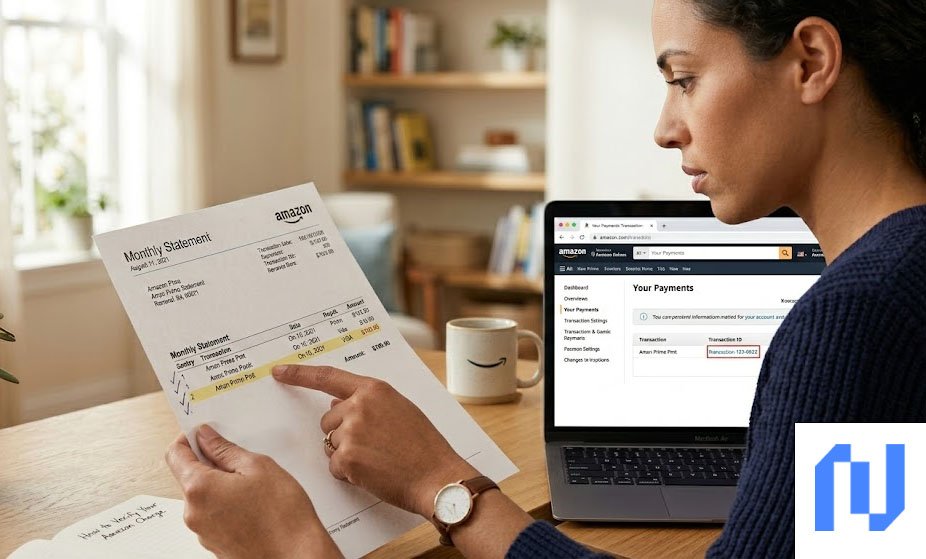
Before you call your bank or report the charge as unknown, take a few minutes to check your Amazon account first. Most of the time, you can find the exact answer there.
Step 1: Go to Amazon.com and sign in to your account.
Step 2: Click on “Account and Lists” at the top right of the page.
Step 3: Select “Memberships and Subscriptions” from the menu. This page shows all your active subscriptions and the next billing date.
Step 4: If you still do not see the charge there, go to “Returns and Orders” and click the “Digital Orders” tab. This is where charges for movie rentals, eBooks, and digital services appear. Many people miss this section because digital orders do not show up in the main order history.
What to Do If You Do Not Recognize the Charge
If you checked your account and still cannot match the charge to any subscription, here are the steps to take:
First, check if someone else in your household signed up for a service using your payment method. Amazon Household sharing allows up to two adults and four teens to use the same account, and their purchases can be billed to the primary card on file.
Second, contact Amazon Customer Service directly. You can reach them through live chat, phone, or email. Amazon’s support team can pull up the exact transaction and tell you what the charge was for. If the charge was a mistake or you qualify for a refund, they can often process it on the spot.
How to Cancel Amazon Prime
If you want to stop the “Amazon Prime Pmts” charges from appearing on your statement, you need to cancel your membership. Here is how to do it:
On the Amazon website:
- Sign in to your Amazon account.
- Go to Account and Lists and click “Manage Prime Membership.”
- Click “Update, Cancel, and More.”
- Select “End Membership” and follow the on-screen steps.
On the Amazon mobile app:
- Open the Amazon app and tap the menu icon.
- Go to “Your Account” and tap “Manage Prime Membership.”
- Tap “End Membership” and confirm your choice.
After you cancel, you can still use your Prime benefits until the end of the current billing period. If you cancel within three business days of being charged and have not used any Prime benefits, you may be eligible for a full refund.
Tips to Avoid Surprise Charges in the Future
A few simple habits can help you stay on top of your subscriptions and avoid unexpected charges on your bank statement.
Set up payment alerts through your bank or credit card app. Most banks let you get a notification every time a charge goes through, so you will know right away when Amazon bills you. Also, make it a habit to review your subscriptions every month by visiting the “Memberships and Subscriptions” page on Amazon. This takes less than two minutes and can save you from paying for services you forgot about.
Conclusion
Seeing “Amazon Prime Pmts” on your bank statement is not something to panic about. It is simply Amazon’s short way of showing a Prime-related payment. Most of the time, it is your regular membership fee, a Prime Video channel, or a free trial that turned into a paid plan. Use your Amazon account to find the exact charge, and contact Amazon support if you need help. And if you no longer want the membership, canceling it is quick and easy.
Frequently Asked Questions (FAQs)
Q1. Is “Amazon Prime Pmts” a scam?
No, it is not a scam. It is a real charge from Amazon for your Prime membership or a related subscription. However, if you truly did not sign up for anything and no one in your household did either, contact Amazon support or your bank right away.
Q2. How do I stop Amazon Prime Pmts charges?
You need to cancel your Amazon Prime membership. Go to your Amazon account, click “Manage Prime Membership,” and select “End Membership.” The charges will stop after your current billing period ends.
Q3. Can I get a refund for an Amazon Prime Pmts charge?
Yes, in many cases you can. If you cancel within three business days of the charge and have not used any Prime benefits, Amazon will usually give you a full refund. Contact Amazon Customer Service to request one.
Q4. Why does the charge say “Seattle WA” on my statement?
Amazon is headquartered in Seattle, Washington. So many Amazon charges on bank statements show “Seattle WA” next to the charge name. This is completely normal and just shows where the company is based.
Q5. How much is Amazon Prime per month in 2025?
Standard Amazon Prime costs $14.99 per month or $139 per year. Students and adults between 18 and 24 can get Prime for Young Adults at $7.49 per month or $69 per year. People who receive government assistance can qualify for Prime Access at $6.99 per month.